you don't have to use or like Ubuntu, but they do have a certified hardware list that might be helpful
this post was submitted on 13 Mar 2026
26 points (93.3% liked)
Linux
63677 readers
294 users here now
From Wikipedia, the free encyclopedia
Linux is a family of open source Unix-like operating systems based on the Linux kernel, an operating system kernel first released on September 17, 1991 by Linus Torvalds. Linux is typically packaged in a Linux distribution (or distro for short).
Distributions include the Linux kernel and supporting system software and libraries, many of which are provided by the GNU Project. Many Linux distributions use the word "Linux" in their name, but the Free Software Foundation uses the name GNU/Linux to emphasize the importance of GNU software, causing some controversy.
Rules
- Posts must be relevant to operating systems running the Linux kernel. GNU/Linux or otherwise.
- No misinformation
- No NSFW content
- No hate speech, bigotry, etc
Related Communities
Community icon by Alpár-Etele Méder, licensed under CC BY 3.0
founded 6 years ago
MODERATORS
Lenovo ThinkPads work very nicely with Linux, and there's a large second-hand market. The T and X series are especially great I find.
The usual advice about avoiding soldered RAM holds in general, but right now used laptops are being bought just for stripping RAM. So I think putting up with soldered RAM in second hand devices (I'd go for at least 32G) can be a smart move because it may be a better deal (and often a smaller form factor).
Depends. Sometimes you'll get a PC magazine or blog cover an upcoming laptop and test Linux compatibility. Or someone writes a long Reddit post after they got it, or updates the Arch Wiki. There definitely are ways to learn about Linux-compatibility with new models. We used to have Amazon comments and reviews...Just be super cautious with all the AI bots and fake comparison sites out there.
And it's a bit more complicated with gaming stuff. Sometimes they'll add a weird webcam, or unsupported RGB LED controller, or have weird quirks in the firmware. Some other model lines like a business laptop from Dell or Lenovo tend to be just fine and you'll get 100% Linux compatibility. There's no guarantee, but any way, after a few Linux nerds blogged about it you should be fine.
Definitely look for a 2nd hand one, you'll have less issues.
Don't go toooo old as some had wifi issues back in the day (no / partial drivers)
There's a lot of refurbs by major brands (ie Dell) that are ex-corp lease models with some kind of warranty (which won't cover the battery) because of the Win10 purge.
I think the GPU is the main issue if you're wanting to play games... and as others have said, gimmicks like touchscreens and fingerprint readers can be hit & miss.
I've installed Mint on Lenovo, Dell and HP laptops with no major issues.
I'm using a 10 years old Razer Blade Stealth 13 on Debian and so far no only minor problems with it.
Consequently my advice is :
- do you actually "need" a new one or do you just "want" one? if the later then could be 2nd hand
- if you do then share either what your "main game" is or what its requirements are, because e.g Slay the Spire runs on nearly anything
- do not buy something brand new unless you are ready to tinker, consider something a year old
- whatever you do, check online review specifically on Linux installations, that will let you know if something somehow (typically inconsequential, e.g. LED tweaking) requires proprietary software
- consider buying directly from a Linux pre-installed vendor, this way you are 100% sure it will work (but it's typically not cheap)
What is this game? And depending on your needs the T480 should be more than good enough
If you want a compatible laptop, you get one that has a version that comes with Linux, without major kernel changes. For example, the DELL laptops. The DELL laptops get hate, but they are tested against Linux. I personally got the 5640: https://files.mastodon.social/media_attachments/files/115/129/776/310/532/073/original/ffe65da00bfd0b39.jpg It now runs Mint and Debian-Testing.
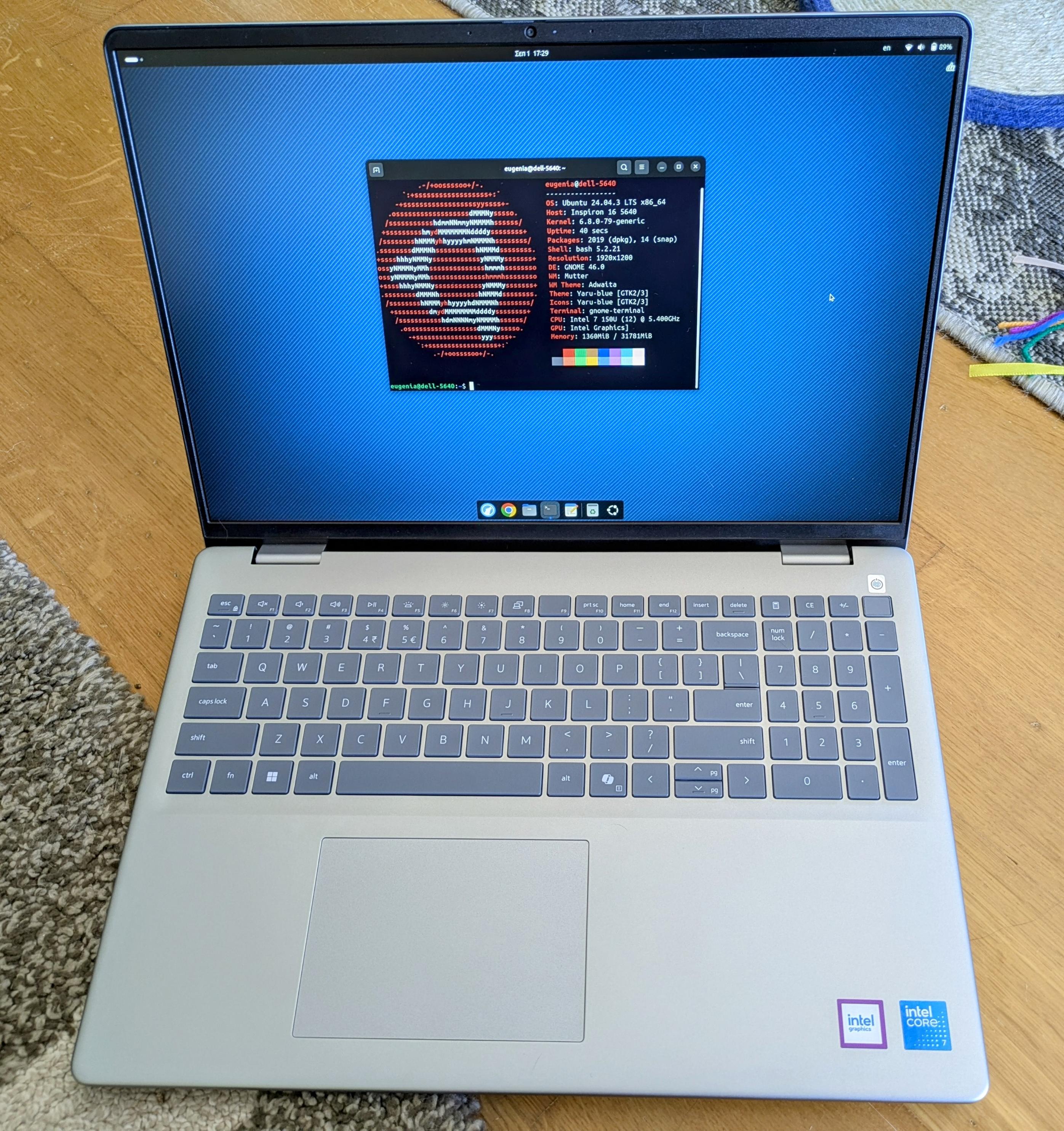
I paid just $900 euros with 32GB of RAM, and my husband got the same with 64GB of RAM for $1000 here in Greece. Everything works 100%, except touchpad's palm rejection (I made a bug report about it).
Make sure the ram is upgradable. A lot of them are soldered on these days and you're stuck with that amount forever.
Latest Lenovo T series come with LPCAMM2 which should replace that soldered nightmare.
https://www.ifixit.com/News/115827/new-thinkpads-score-perfect-10-repairability
https://www.ifixit.com/News/95078/lpcamm2-memory-is-finally-here
You can save buckets of money looking for used hardware. I got a crazy nice laptop from Craigslist for <$300.
If you can, bring a live USB stick with you and test it out before you purchase. Check peripherals like wifi, audio, camera, bluetooth, etc.
Are you looking for a gaming laptop with a dedicated gpu or just a newer one with a faster cpu/igpu?
A gaming laptop. My current one is fine for most everything else at this point. I don't game super hard, but when I play my go-to game or try out something new, I wanna at least not be bouncing between 30-45 FPS.
Fingerprint readers and touchscreens can be hit or miss for Linux support.
I think this is a list of supported readers. When you get a shortlist of devices you want to purchase, compare its fingerprint reader with this list: https://fprint.freedesktop.org/supported-devices.html
Amazon renewed I find dell Inspiron or xps work well. Used to be Lenovo think pads but not so sure about the newer ones.
See if anyone has reviewed how the model of interest performs under Linux or check if there's a report for it on linux-hardware.org
Around 2020, I had purchased a new laptop and desktop. It took about two years until everything worked on the laptop under Arch, main issue being the microphone and speakers. About another year and a half until the same on Debian. On the desktop, the wireless card didn't work with Linux on day one and still doesn't work that well on Linux to this day. Swapped that thing out with an Intel wireless card.
Some newer laptops use MIPI cameras which aren't as consistently supported on Linux yet. The situation has improved a lot in the last couple years, but if you can, check compatibility for the specific laptop and distribution/kernel version you plan to use.