No AI? Are they allowed to do that? Are you sure?
this post was submitted on 08 Jan 2026
336 points (98.8% liked)
Linux
63274 readers
514 users here now
From Wikipedia, the free encyclopedia
Linux is a family of open source Unix-like operating systems based on the Linux kernel, an operating system kernel first released on September 17, 1991 by Linus Torvalds. Linux is typically packaged in a Linux distribution (or distro for short).
Distributions include the Linux kernel and supporting system software and libraries, many of which are provided by the GNU Project. Many Linux distributions use the word "Linux" in their name, but the Free Software Foundation uses the name GNU/Linux to emphasize the importance of GNU software, causing some controversy.
Rules
- Posts must be relevant to operating systems running the Linux kernel. GNU/Linux or otherwise.
- No misinformation
- No NSFW content
- No hate speech, bigotry, etc
Related Communities
Community icon by Alpár-Etele Méder, licensed under CC BY 3.0
founded 6 years ago
MODERATORS
- Types in username and password
"Perfect! You are now logged into your computer. Enjoy your desktop!"
- Nothing happens. Try to log in again
"You're absolutely right, I failed to log you in while claiming you had actually logged in. Good catch! I'll log you into your system now. Have fun!"
- Nothing happens
Made me laugh
I demand newly minted slop on every wake from suspend 😤
Already created a issue ticket /s
I demand a KoChauffeur+ button. How are we supposed to login to our computer without a ~~slop~~chatbox!?
Feature request: AI password validator , because who needs central directory anyway
Letting AI decide if I entered the correct password is so much better than actually storing the passwords in an encrypted keychain (which can be hacked!!!). AI is revolutionizing security. This is the way of the future. /s
Very cool. I’m consistently impressed by the KDE devs.
Thank god SDDM is a nightmare
What's bad about SDDM?
It always chooses the default highest resolution, (which may not work on some devices with faulty EDID), does not respect the Wayland/X11 choice, has a long pause when going from login screen to desktop and does not support 24h clocks.
Just to name a few.
has a long pause when going from login screen to desktop
Yea I have noticed this. It takes a long time to switch back as well when you lock the computer, logout, switch users, etc
The first one I think is a fundamental limitation in that display preferences by default is per-user. Maybe this makes it work for you? https://feddit.online/post/1350756/comment/6636228
The 24h clock might be similar - check your system-wide locale.
load more comments
(1 replies)
load more comments
(1 replies)
Things I've run into:
-
Out of the box, the lock screen comes on after screen unblanking - late enough that when things aren't snappy you can briefly catch the desktop without reauthing.
-
Sometimes randomly after wake, keyboard input is not recognized in the password field at all. Except for Esc, which in this state appears to crash-restart it and makes it work again
-
With a multi-monitor setup, I have still not been able to properly force the primary monitor. Is an issue because things like notifications and the login input will only show up on a usually turned off projector. This one might be PEBCAK.
I have issues 1 and 3 with XFCE on lightdm, too, though.
I have the same multiple monitor issue. I have an ultrawide on display port, and a smaller monitor on hdmi. Boot messages default to the ultrawide but the login prompt also defaults to the secondary display. Minor thing I know, but irritating.
The lock screen and display manager are two separate pieces of software. The display manager runs before a user profile has been selected for graphical login, so it does not have access to your user desktop/display settings
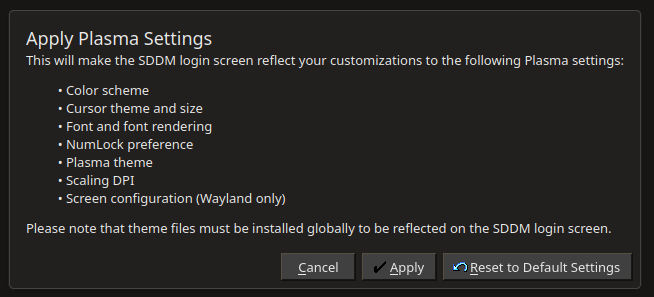
there's a button to apply Plasma settings to SDDM for this purpose, it prompts for admin password when you do it, which makes sense
load more comments
(1 replies)
load more comments
(2 replies)
My biggest issue: no support for rdp
Pet peeve: In immutable distros you can't change the background image... and I happen to strongly dislike Aurora's artwork. I run Aurora on my work laptop, and my login screen looks like some kind of a bizarre childish acid trip. Embarrassing to say the least, but the distro itself is top notch.
Damn. I wonder when this trickles down to CachyOS and Bazzite.
Quickly in Bazzite, not at all in Cachy since that's based on Arch.
But you can choose your login manager on Arch, too.
And yet, Fedora changing their default login manager won't affect Arch.
??? are you being serious? obviously fedorah isnt arch.
anyway, Cachy will have it the second KDE adds it to the plasma / kde-applications packages.
load more comments
(5 replies)
I guess that person didn't know they could set it up themselves. Maybe they meant that it's installed and configured automatically on new installs.
load more comments
(2 replies)
load more comments
(1 replies)
What kind of argument is that?
It's already in AUR, you can install it right now if you want.
Right, but since it isn’t based on Fedora, which this post is about, what Fedora is doing has no bearing on what CachyOS uses as its defaults.
load more comments
(5 replies)
load more comments
(2 replies)
looking forward to it, sddm is the only thing I have left that depends on xorg directly
Fedora will be the first distro? Adopting it even faster than KDE Neon, a distro made by KDE itself?
KDE neon is really only a development platform, and it is barely maintained.
Ah, TIL. I just figured it was the KDE-est general-purpose distro.
But still, shouldn't it at least have a development version of Plasma Login Manager sooner than any others, for testing?
it probably does, but it isnt considered a 'real' distro since it isnt suitable for non-development use (nor is it meant to be). its a very common misconception about KDE neon to think that since it's the KDE branded one it must be the best general-purpose KDE distro.
thats why they are making KDE Linux. KDE Linux is going to be what a lot of people mistakenly take neon to be while also fulfilling the role of 'development standard implementation/example implementation for distros to reference' much better.
load more comments
(1 replies)
KDE Linux will probably have it first.
Edit: nevermind. https://invent.kde.org/kde-linux/kde-linux/-/merge_requests/350
meanwhile I just want to go back to blank/black lockscreen with no visual cues and you just type the password and nothing happens of it's wrong, but I've been quite sick of trying to look up how to do forgotten things I had on older systems only to get AI slop guides that ramble on with a hallucinated life story and either never getting to the point of just not working.
I wish no visuals could just be a setting on all distros
load more comments
(2 replies)
Easy Chinese/Japanese/Korean/Vietnamese (CJK) input
This reminds me of what a pain in the it was for me to get an IME working. I may not be smart, but even accounting for that, it was unnecessarily complicated.
view more: next ›