Idk if it counts as less popular, but I always thought Sublime got too much flak. The popups are annoying, but other than that it's a great editor imo. It doesn't have the bells and whistles of something like VSCode or a full IDE, but that's also why I like it, it's much more snappy and lightweight. And you can still get things like LSP working so for me at least it gives me everything I look for in an editor. I even decided to pay for a license a few years back, considering I make my salary with this thing the cost is negligible.
this post was submitted on 05 Oct 2023
0 points (NaN% liked)
Linux
62811 readers
139 users here now
From Wikipedia, the free encyclopedia
Linux is a family of open source Unix-like operating systems based on the Linux kernel, an operating system kernel first released on September 17, 1991 by Linus Torvalds. Linux is typically packaged in a Linux distribution (or distro for short).
Distributions include the Linux kernel and supporting system software and libraries, many of which are provided by the GNU Project. Many Linux distributions use the word "Linux" in their name, but the Free Software Foundation uses the name GNU/Linux to emphasize the importance of GNU software, causing some controversy.
Rules
- Posts must be relevant to operating systems running the Linux kernel. GNU/Linux or otherwise.
- No misinformation
- No NSFW content
- No hate speech, bigotry, etc
Related Communities
Community icon by Alpár-Etele Méder, licensed under CC BY 3.0
founded 6 years ago
MODERATORS
I use Pulsar for working on my many JavaScript projects. It's a FOSS, community-maintained replacement for the canceled Atom text editor.
Emacs. Everything.
I'll give you six that I haven't seen mentioned yet:
-
simandvis, both of which focus on combiningvimmotions with structural regular expressions as used in... -
samandacmefrom Plan 9, both of which are included in Plan 9 from User Space (akaplan9port).samalso has a modified/expanded version in the form ofdeadpixi/sam, whileacmehas spin-offs like a port to Go and a standalone version. -
mg, one of the three default text editors included with OpenBSD (the others beingvianded). -
sandy, the abandoned suckless text editor. It usesdmenuand is fun to mess with for shits and giggles.
I've been using Lapce for a bit and it's pretty cool, like VSCode but written in Rust. It's actually so much faster, like you press a key and there's instantly autocomplete suggestions and error warnings, so it feels a lot more responsive than VSCode. It also opens faster. There's still a couple weird things and missing functionality though because it's early in development so I'll probably go back to VSCode for now.
Helix. A perfect programmer's editor you can use with almost no config.
Interesting. Have you spent any time with neovim? If so, I'm curious how they compare. I was just starting to investigate the nvim ecosystem, but it's quite daunting. Still, I like the idea of everything being open source, and using plugins to augment my workflow.
Helix was inspired by neovim. Though mostly the inbuilt LSP/tree sitter support. Its keybindings are a mix between what neovim has and kakoune, though closer to kakoune I think. The major advantage IMO that helix has over neovim is built in support for most things you need plugins for in neovim as well as sane defaults out the box. You don't need 10s of plugins and 100s of lines of config to get helix to work like a modern editor - it just does out the box. All you need to do is install the LSP server for the languages you are interested in and launch helix.
The major downside ATM is it has no plugin support at all. Which is not as bad as it sounds as it includes so much out the box that you would typically require plugins for in neovim. They are working on plugin support though so it is only a matter of time for this to be fixed. Currently I don't feel the need for any plugins when using it so IMO it is not a deal breaker for me or my workflow. But the need to manage large configs and sets of plugins had already become too cumbersome in neovim for my liking.
[This comment has been deleted by an automated system]
I'd describe it as "NeoVim for people who don't want to spend time configuring it". It has syntax highlighting (for pretty much any language you can think of) and LSP support out of the box. And the config file is just a TOML file. Here's my current config for example:
theme = "monokai_pro_spectrum"

[editor]
line-number = "relative"
middle-click-paste = false

[editor.statusline]
mode.normal = "NORMAL"
mode.insert = "INSERT"
mode.select = "SELECT"
That's it. No need to deal with Lua or VimScript
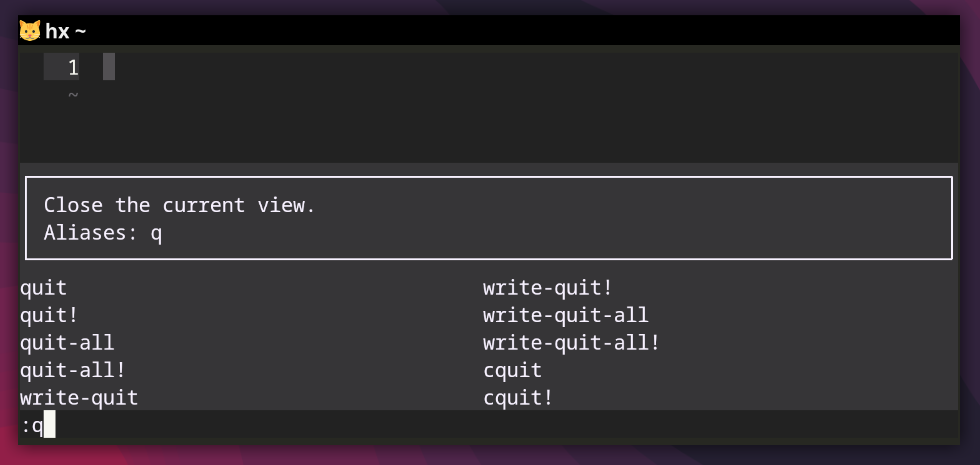
Also using commands after typing the : is easier than in NeoVim since Helix will show you a list of available commands and a description of the closest match (or the one you choose from the list with the tab key). It looks like this:
I use Helix for quickly editing files and coding
Another vote for hx!
Getting a productive setup for Python work is a matter of a few extra lines of TOML. The pre-release version on master also allows for multiple LSPs per language, which means I can combine pyright with ruff.
The modal key chords are verb-object instead of object-verb. It’s not a main selling point to me. However, you get multi-cursors out of the box, which I’ve always found simpler than e.g. macros. In general, keybindings are discoverable. I learn something new every week.
All in all, despite a few rough edges, it’s a nice alternative to needing to get a PhD in neovim configuration to get anywhere remotely near the cool setups other people are rocking.