this post was submitted on 18 Jan 2026
159 points (94.4% liked)

Linux

61501 readers
562 users here now

From Wikipedia, the free encyclopedia

Linux is a family of open source Unix-like operating systems based on the Linux kernel, an operating system kernel first released on September 17, 1991 by Linus Torvalds. Linux is typically packaged in a Linux distribution (or distro for short).

Distributions include the Linux kernel and supporting system software and libraries, many of which are provided by the GNU Project. Many Linux distributions use the word "Linux" in their name, but the Free Software Foundation uses the name GNU/Linux to emphasize the importance of GNU software, causing some controversy.

Rules

Related Communities

Community icon by Alpár-Etele Méder, licensed under CC BY 3.0

founded 6 years ago
MODERATORS
159
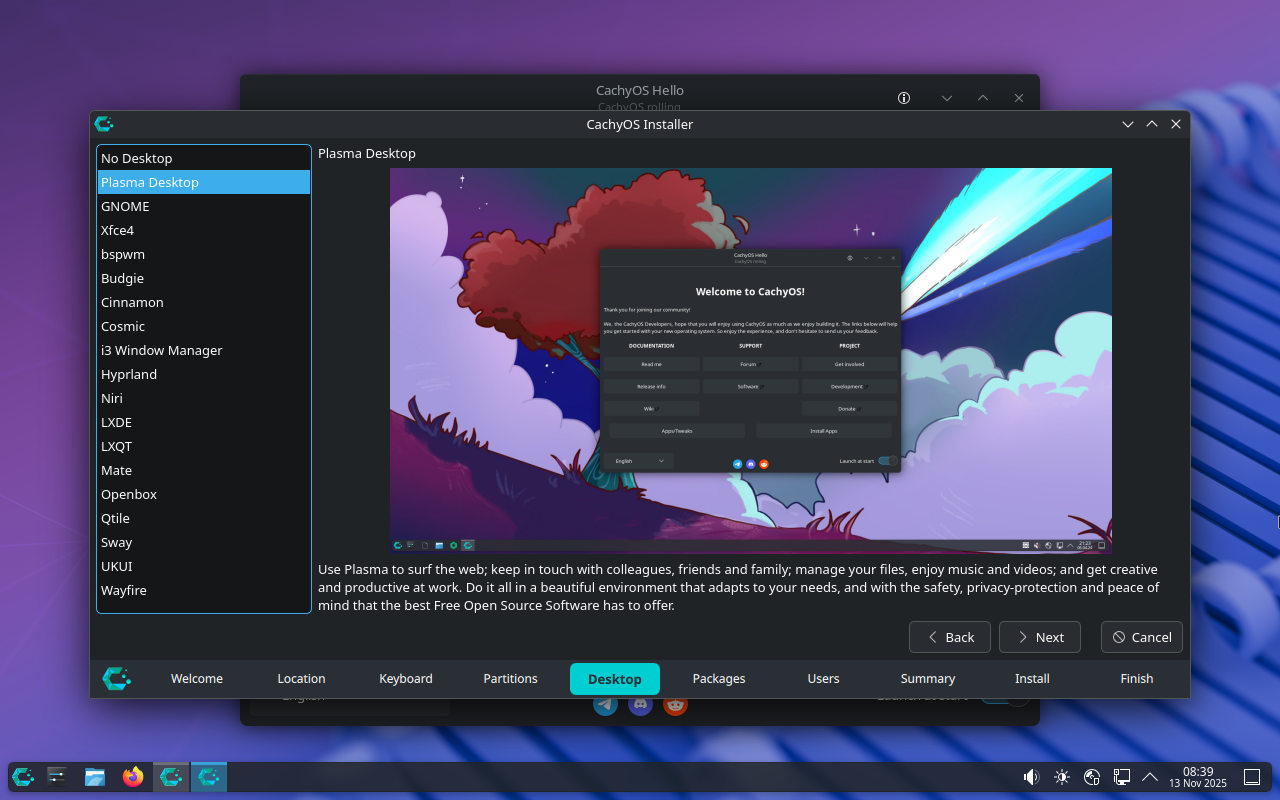
Why don't more distros use this method? (www.virtualizationhowto.com)
submitted 1 week ago* (last edited 1 week ago) by artyom@piefed.social to c/linux@lemmy.ml
 

It's very nice to not have a dozen different versions of the same distro to parse through and figure out that are simply the same distro with a different DE. Moreover, very few of them offer this many options.

Cachy could be doing a better job explaining what the user is looking at here and who each of these is for. Pretty easy to sum up in 1-2 sentences...

top 50 comments
sorted by: hot top controversial new old
[–] Floopquist@lemmy.org 2 points 6 days ago (1 children)

It just happens that I tried to install a few of them the last 2 days.

  1. Niri: Installation worked, but I don't like that the task bar on top can't be interacted with the mouse. I don't know if it's a bug, but it annoyed me. Pressing the Super Key did nothing, I expected to be able to select an app to launch. Frustrating. - Reinstalled again
  2. i3: The installation took a whopping 2.5 hours. After the restart I was greeted with "login username: _" and no DE. Pressing CTRL+ALT+F1, F2, F3 didn't change anything. So the installation was just broken. - Reinstalled again
  3. Cosmic: Installation worked, the default cachy Software Center did not. "Cosmic Marketplace" or how it's called, was an icon in the start bar, but the icon was empty and on mouseclick nothing happened. No program started. Always when I executed something that required admin rights, I just got an "Authentication failed" and was unable to type in the password field. - Reinstalled AGAIN!

That time with Ubuntu 25.10 and it worked, except selecting the default program for .txt files (I wanted to use Kate, but it throws an error)("Find new application" > Error > Failed to execute child process "gnome-software" (no such file or directory)).

All in all, it's nice to get an overview of what may be possible, but to test all of this is nearly impossible. I selected most installer options out of the box. Always chose disk encryption if possible. Over half of my installations in the last 2 days failed.

[–] artyom@piefed.social 0 points 6 days ago

Yeah, I tried Cachy previously on my desktop and it was honestly an awful experience. But not really anything to do with the DE(s).

[–] texture@lemmy.world 66 points 1 week ago* (last edited 1 week ago) (2 children)

this is just calamares, the most used installer across the span of linux distros.

on the question of why this approach vs dedicated desktop environment installs, well, ive always wondered about the pros and cons on that too. one pro is that with a dedicated DE iso you dont need an internet connection to install it. otherwise im not sure why people would choose one or the other.

[–] artyom@piefed.social 25 points 1 week ago (1 children)

one pro is that with a dedicated DE iso you dont need an internet connection

That's a good reason. I didn't realize this one did.

[–] 4am@lemmy.zip 13 points 1 week ago (2 children)

It’s not 100% true that you need an internet connection…your install media will just be unnecessarily huge since 100% of users will only be using part of it. And, you’ll have to pay to host and distribute it, most for no reason, every time.

It would be cool if they did make an “everything” image for offline installs though; as preparation when when they take away the internet…

[–] artyom@piefed.social 4 points 1 week ago (1 children)

you’ll have to pay to host and distribute it, most for no reason, every time.

I DLed Cachy with the torrent. Another thing I wish more distros would offer, haha! It was 2.8GB. I'm not sure if that's big or not really, I don't typically pay attention.

I had an Ethernet cable connected so I wouldn't have had to connect it manually, that's why I don't know if it was necessary.

[–] lucas@startrek.website 17 points 1 week ago (2 children)

I DLed Cachy with the torrent. Another thing I wish more distros would offer, haha!

I don't think I've ever encountered a distro that doesn't offer a torrent download option, since it saves the project expensive hosting costs.

[–] MyNameIsRichard@lemmy.ml 8 points 1 week ago (1 children)

Tumbleweed doesn't offer a torrent because there's a new iso nearly every day.

[–] lucas@startrek.website 3 points 1 week ago

That kind of case makes sense, actually.

[–] artyom@piefed.social 3 points 1 week ago (2 children)

Well now you have. Just the first one off the top of my head.

[–] lucas@startrek.website 4 points 1 week ago* (last edited 1 week ago)

Wow, that's wild. I guess that's what you get from being such a young/niche project, they haven't had the time/demand to come up against the problems that all the other distros had to solve years ago.

load more comments (1 replies)
[–] kumi@feddit.online 2 points 1 week ago* (last edited 1 week ago) (1 children)

Debian has this (well, for sources at least) and I think it's somewhere between 20-30 DVD images for actually-everything. Maybe not something for the day-to-day but great to keep on hand for preppers and the paranoid (:

[–] 4am@lemmy.zip 1 points 6 days ago

I’m not quite there yet to the point of archiving actually-everything, but I’m getting there

[–] Dojan@pawb.social 2 points 1 week ago

Simplicity for users and support staff.

I don't think that the average user cares for customisation far beyond wallpaper, and perhaps theme. Note I'm not saying average Linux user, I mean average person using a device. Think your aunt who can't plug in the printer. Faced with too many options people shut down.

If you have a distro and need to offer support for it, it also helps if you can write guides and instructions for a single type of scenario. With Windows you can say "right click the start menu, click device manager..." etc, but that's not quite as easy on Linux. You can always direct people to the terminal, but again, the average user is likely to balk at the idea.

Choosing a dedicated DE means you have less to maintain, and less to support, and can focus your efforts elsewhere.

[–] D_Air1@lemmy.ml 32 points 1 week ago (1 children)

The reason most distros don't do this is because they usually try to steer users to their preferred desktop. I don't mean that in a bad way, but often they call it the flagship edition. This is usually the desktop environment that they develop and test. Think Linux Mint with Cinnamon, popOS with Cosmic, Zorin, etc. Pretty much every other distro that has options do exactly what you are showing through the use of the venerable calamares installer that you see in your screenshot.

[–] artyom@piefed.social 6 points 1 week ago* (last edited 1 week ago) (1 children)

The reason most distros don't do this is because they usually try to steer users to their preferred desktop

They don't though, they just offer a dozen different options that are offered as entirely different "distros" with no explanation of what they are. Look at the Linux Mint page. You click download and you're presented with 3 options with no explanation of what they are, which one you should choose or why.

[–] yo_scottie_oh@lemmy.ml 13 points 1 week ago (1 children)

Have you actually visited the download page that you linked? Because it has screenshots, explanations, whole nine yards.

[–] artyom@piefed.social 4 points 1 week ago* (last edited 1 week ago) (4 children)

How do you think I got it? There is no explanation of what they are, which one you should choose or why. Just generic information that describes every Linux distro.

Put yourself in the shoes of a new Linux user and ask yourself what good those screenshots are.

[–] yo_scottie_oh@lemmy.ml 7 points 1 week ago (1 children)

One of the great things about Linux is that if the user is still undecided after reading the paragraphs and looking at the screenshots, they can boot into the live environments and see for themselves which one is right for them.

[–] artyom@piefed.social 7 points 1 week ago

You're expecting way too much of a new user. There's already 309534 distros to choose from, now you want them to boot into a dozen live environments of each one?

[–] Strit@lemmy.linuxuserspace.show 6 points 1 week ago (4 children)

Ho much does the screenshot you posted say, that the screenshots on the Mint download page does not? Other than giving you more options, which can overwhelm new people.

Some distro's really like doing their curated live environment for each environment, so you can test it out before actually installing it.

load more comments (4 replies)
[–] fhein@lemmy.world 5 points 1 week ago (1 children)

I think a new Linux user shouldn't have to choose a DE, so starting with a distro which makes this choice for them is most likely better. Unless the CachyOS installer does a good job at explaining what a desktop environment is, there's a risk that a new user thinks they're just selecting a skin for the OS and don't understand how it will affect their desktop experience. If they for example choose an extreme light weight DE for their brand new gaming PC, their first impression of Linux might be that it looks dated.

Having a DE chooser built into more distro installers could be a good thing for us more experienced users though.

[–] artyom@piefed.social 2 points 1 week ago

I think a new Linux user shouldn't have to choose a DE, so starting with a distro which makes this choice for them is most likely better.

I mean that's a fair point but most don't do that either. Even supposedly-beginner-friendly distros (which this is not) like Mint don't do that.

load more comments (1 replies)
[–] placebo@lemmy.zip 21 points 1 week ago

It's probably easier to maintain clean and dedicated distribution packages rather than putting everything into one giant pile. I'm not a maintainer, but I imagine this is similar to coding.

[–] Jayjader@jlai.lu 21 points 1 week ago (4 children)

Pretty easy to sum up in 1-2 sentences...

Then by all means, give them your 1-2 sentences per DE so that they "only" need to include them!

Frankly, I think it's a lot harder than you're making it out to be, especially over such a large range of DEs. Not that the suggestion is without merit, just that the assumed difficulty of making it work as intended (i.e. actually helping a new Linux user pick the "right" desktop environment for them) seems underestimated.

Maybe Cinnamon can get away with "it's like windows 95", but Gnome and i3 are quite different from anything the target audience has ever experienced.

load more comments (3 replies)
[–] lime@feddit.nu 15 points 1 week ago* (last edited 1 week ago) (4 children)

i think that's calamares, so any distro that uses it can technically do this. the reason most don't is that you can just add more DE's after install. i know endeavourOS and openSUSE do this, and i think fedora has something like this too?

but the main reason is to keep install size to a minimum. if you want your system to be installable without an internet connection you can't just ship every DE known to man.

[–] artyom@piefed.social 12 points 1 week ago* (last edited 1 week ago) (1 children)

you can just add more DE’s after install

You sure can but that involves:

  1. Knowing the option exists

  2. knowing where it is

  3. Not screwing it up

[–] lime@feddit.nu 4 points 1 week ago (8 children)

reading the manual is sort of compulsory if you want to do stuff like changing DEs, and for most people (read: the 99% that don't know what "operating system" means) the mere existence of a choice is enough to cause paralysis.

i really do like the new wave of "opinionated" distros like kalpa, cachy and aeon where the system takes care of most issues rather than the user having to deal with them. shows maturity. but this selector screen sort of runs contrary to that. either be opinionated or be fully free, imo.

load more comments (8 replies)

During the OpenSuSE install you can choose custom package collections (or packages). So you can install any of the DEs available and multiple DEs if you want. You can deselect the default DE and chose something else entirely.

It's not put front and centre as an option like CachyOS seems to be doing but is easily accessed in a submenu.

[–] adarza@lemmy.ca 4 points 1 week ago

it looks like cachyos just makes available anything in arch's repos that worked for them at that time.

[–] smeg@feddit.uk 2 points 1 week ago (1 children)

you can just add more DE's after install

Isn't this advised against? I was told it was simple to do, tried it, it didn't work, then I found loads of people saying to never do it!

[–] lime@feddit.nu 3 points 1 week ago

when you install a DE as part of system setup it's usually preconfigured by the distro maintainers. otherwise you need to do that configuration yourself, which is more difficult.

[–] MonkderVierte@lemmy.zip 10 points 1 week ago (5 children)
load more comments (5 replies)
[–] Evil_Shrubbery@thelemmy.club 7 points 1 week ago* (last edited 1 week ago) (2 children)

It's nice, but how much can this help you chose a DE without further research? Just by desktop pic that you can often change the layout?

Anyway, at least openSUSE (outside of Proxmox Tumbleweed is the only thing I've installed for years now) offers this (with less options) on install too, but mostly I feel like anyone done choosing a distro also knows a bit about DEs. That's why the des on your pic is just a generic promo that can't explain how the DE feels or how it compares to others.

I see this as a very nice & pleasant UI (Calamares?) feature tho & it's nice if it's getting traction - but I'm not sure how much it helps new users - what guides them? Or for that matter how to switch between DEs if you install more than one?

[–] mub@lemmy.ml 9 points 1 week ago (1 children)

I always thought they should have a 15 second gif for each DE showing off the general form factor. That looks and feel is all most people care about.

[–] Evil_Shrubbery@thelemmy.club 1 points 1 week ago* (last edited 1 week ago)

Yes, this would be the real deal!

Maybe a few smaller ones bcs full-screen-res gifs would be very hw intensive, but this would def help me to give me a general vibe of how this distro with that DE would feel like.
(Then again, websites are kinda made for this purpose, tho a few MBs more in the boot/installer iso wouldn't hurt. Minimal versions of distros are usually separate either way.)

[–] artyom@piefed.social 3 points 1 week ago

It's nice, but how much can this help you chose a DE without further research?

It's not supposed to. If they did this the way most do, they would have 20 different distros listed on their webpage.

[–] PanArab@lemmy.ml 2 points 1 week ago (1 children)

Installing additional DEs should be made more straightforward. I'm comfortable using the terminal but I don't think many know that you can have multiple installed at the same time and can switch between them at login.

[–] polle@feddit.org 6 points 1 week ago

Being able to doesnt mean its recommended. I played around with that in a vm and it looks like some DE use same parts of the config files. Which result into inconsistent themeing/UI. Like random wrong colors, icons and fonts.

load more comments
view more: next ›